We deliver all over europe
  • Business customer?
  • info@vesa-adapter.com
  • en en
    de Deutsch fr Français it Italiano es Español
  • EUR EUR
    USD USD GBP GBP
  • Register or Sign in
vesa-adapter.com
vesa-adapter.com
  • Monitor Mounts
    • Desk Mounts
    • Wall Mounts
    • Monitor Stands
    • Accessories
  • TV Mounts
    • TV Ceiling Mounts
    • TV Stands & Floor Stands
    • TV Wall Mounts
  • VESA Adapters
    • Acer
    • AOC
    • ASUS
    • BenQ
    • CSL
    • DELL
    • HP
    • HP Omen
    • Huawei
    • Koorui
    • Lenovo
    • LC-Power
    • MSI
    • ODYS
    • Philips
    • Samsung
    • Viewsonic
    • Xiaomi
  • VESA Extensions
    • VESA Adapter Plates
    • VESA Spacers
    • Height Adjustable VESA Adapters
  • Device Mounts
    • Camera Mounts
    • PC Mounts
    • Soundbar Mounts
  • Accessories
    • Screen Cleaners
    • Cable Management
    • Screws & Mounting Sets
    • Extension Arms
  • Ergonomics Guide
    • 1. Introduction to ergonomics
    • Ergonomics in the workplace
    • 2. Technology and ergonomics
    • VESA Standard
    • Inches to CM Calculator
    • All VESA standards
    • VESA monitor mount
    • Identify VESA standard
    • VESA Adapter for gaming
    • 3. FAQ
    • FAQ about VESA standard
    • 4. VESA adapter
    • VESA adapter Acer
    • VESA adapter AOC
    • VESA adapter ASUS
    • VESA adapter BenQ
    • VESA adapter CSL
    • VESA adapter DELL
    • VESA adapter HP
    • VESA adapter Odys
    • VESA adapter LC-Power
    • VESA adapter HP Omen
    • VESA adapter HUAWEI
    • VESA adapter Koorui
    • VESA adapter Lenovo
    • VESA adapter MSI
    • VESA adapter Philips
    • VESA adapter Samsung
    • VESA adapter Viewsonic / Medion
    • 5. News
    • VESA for ODYS Q27 und Q27 Pro Monitor
    • VESA for LC-Power LC-M27 monitor
    • 6. Wissen & Technik
    • Focus on monitor mounts: Mechanics, assembly, and stability
    • Single Monitor Desk Mount Comparison
    • Monitor Mount for 2 Monitors comparison (Desktop Mount)
    • Das perfekte Home-Office Setup
    • VESA-Adapter für jeden Monitor
    • Ultrawide & Curved Monitore sicher montieren: Der
    • TV Wandhalterung sicher montieren
    • TV Halterung im Wohnmobil
  • en en
    de Deutsch fr Francais it Italiano es Español
  • EUR EUR
    USD USD GBP GBP
  • Monitor Mounts
    Desk Mounts
    Wall Mounts
    Monitor Stands
    Accessories
  • TV Mounts
    TV Ceiling Mounts
    TV Stands & Floor Stands
    TV Wall Mounts
  • VESA Adapters
    Acer AOC ASUS BenQ CSL
    DELL HP HP Omen Huawei Koorui
    Lenovo LC-Power MSI ODYS Philips
    Samsung Viewsonic Xiaomi
  • VESA Extensions
    VESA Adapter Plates
    VESA Spacers
    Height Adjustable VESA Adapters
  • Device Mounts
    Camera Mounts
    PC Mounts
    Soundbar Mounts
  • Accessories
    Screen Cleaners
    Cable Management
    Screws & Mounting Sets
    Extension Arms
  • Ergonomics Guide
    1. Introduction to ergonomics
    • Ergonomics in the workplace
    2. Technology and ergonomics
    • VESA Standard
    • Inches to CM Calculator
    • All VESA standards
    • VESA monitor mount
    • Identify VESA standard
    • VESA Adapter for gaming
    3. FAQ
    • FAQ about VESA standard
    4. VESA adapter
    • VESA adapter Acer
    • VESA adapter AOC
    • VESA adapter ASUS
    • VESA adapter BenQ
    • VESA adapter CSL
    • VESA adapter DELL
    • VESA adapter HP
    • VESA adapter Odys
    • VESA adapter LC-Power
    • VESA adapter HP Omen
    • VESA adapter HUAWEI
    • VESA adapter Koorui
    • VESA adapter Lenovo
    • VESA adapter MSI
    • VESA adapter Philips
    • VESA adapter Samsung
    • VESA adapter Viewsonic / Medion
    5. News
    • VESA for ODYS Q27 und Q27 Pro Monitor
    • VESA for LC-Power LC-M27 monitor
    6. Wissen & Technik
    • Focus on monitor mounts: Mechanics, assembly, and stability
    • Single Monitor Desk Mount Comparison
    • Monitor Mount for 2 Monitors comparison (Desktop Mount)
    • Das perfekte Home-Office Setup
    • VESA-Adapter für jeden Monitor
    • Ultrawide & Curved Monitore sicher montieren: Der
    • TV Wandhalterung sicher montieren
    • TV Halterung im Wohnmobil
Business customer?
Business customer?
  1. Home
  2. Single Monitor Desk Mount Comparison
vesa-adapter.com COMPARISON

The Best Single Monitor Mounts: Technology & Price

📅 Updated: Jan 06, 2026 ✍️ Editor: Julius E. 🛡️ How we test

We compare current monitor mounts for desks (single arms for 13–49 inches) regarding stability, gas spring technology, and VESA standards. (Details on how they work can be found in our Technology Guide). Our compact test helps you immediately find the suitable monitor arm for your gaming or home office setup.

Model & Recommendation Load & Physics Flexibility Mounting & VESA Price / Verdict
#1
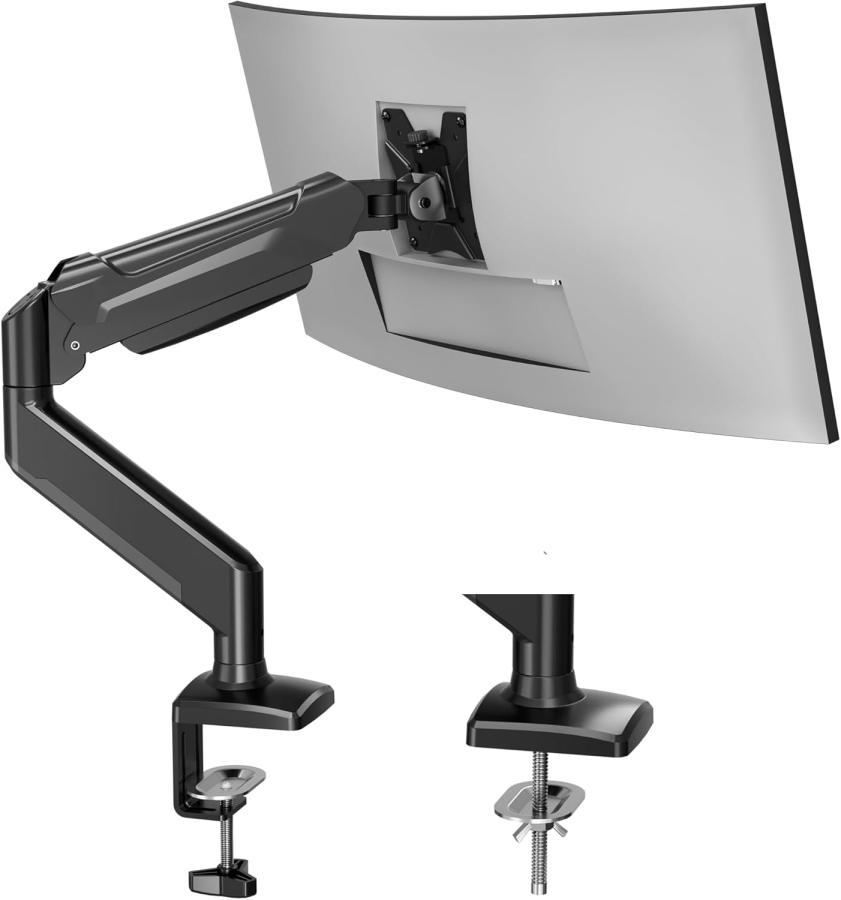
BONTEC Gas SpringBONTEC Gas Spring (GDM7501)🏆 Best Value Winner
9 kg
max. load
up to 32"
max. size

min. 2.8 kg
  • Tilt: +/- 90°
  • Swivel: +/- 90°
  • Rotation: 360°
  • Height range: 280 mm (stepless)
  • Mechanism: GAS SPRING
  • VESA: 75x75 / 100x100
  • Mounting: C-Clamp & Grommet
  • Desk: 10 - 70 mm
  • Material: Steel / Alu
✅ Ideal for:
Daily Home Office (Ergonomics)
46,78 €
In Stock ✔
Over 230x sold
1.3 Very Good
View Deal Arrow right
More Details & Technical Data ▼

Technical Details: BONTEC Gas Spring (GDM7501)

1. Load Capacity: 3 - 9 kg
2. Monitor Size: 13 - 32 Inches
3. Mechanism: Gas Spring
4. VESA Standard: 75x75 & 100x100
5. Tilt: +/- 90°
6. Swivel: +/- 90°
7. Rotation: 360°
8. Height Range: 280 mm (stepless)
9. Mounting Type: Standard (C-Clamp & Grommet)
10. Desk Thickness: 10 - 70 mm (Clamp)
11. Net Weight: 2.8 kg
12. Special Feature: U-shaped joint head
💬 Our Verdict

"The BONTEC Monitor Mount 1 Monitor (GDM7501) is our best value winner for 13-32 inch screens. Thanks to the fully movable gas spring, your ergonomic desk mount can be adjusted effortlessly – perfect for your dynamic home office setup."

#2
ARES WING GDT1009WHARES WING White (GDT1009WH)
12 kg
max. load
up to 40"
max. size

min. 2.0 kg
  • Tilt: +80° / -45°
  • Swivel: 180°
  • Rotation: 360°
  • Height range: 280 mm (stepless)
  • Mechanism: GAS SPRING
  • VESA: 75x75 / 100x100
  • Mounting: C-Clamp & Grommet
  • Desk: 10 - 84 mm
  • Material: Aluminium / Steel
✅ Ideal for:
Clean-Desk & Apple-Setups
65,30 €
In Stock ✔
Over 250x sold
1.6 Good
View Deal Arrow right
More Details & Technical Data ▼

Technical Details: ARES WING GDT1009WH

1. Load Capacity: 2 - 12 kg
2. Monitor Size: 17 - 40 Inches
3. Mechanism: Gas Spring
4. VESA: 75x75 & 100x100
5. Tilt: +80° / -45°
6. Swivel: 180°
7. Rotation: 360°
8. Height Range: 280 mm (stepless)
9. Mounting: C-Clamp & Grommet
10. Desk Thickness: 10 - 84 mm
11. Net Weight: -
12. Special Feature: Quick-Release
💬 Our Verdict

"If you are looking for a white monitor desk mount for your clean-desk setup, choose the ARES WING. This stylish gas spring arm effortlessly carries your curved & flat screens from 17-40 inches (up to 12kg) and combines design with heavy-duty stability."

#3
ARES WING GDT1001LARES WING GDT1001L
20 kg
max. load
up to 49"
max. size

min. 2.0 kg
  • Tilt: +50° / -20°
  • Swivel: +/- 90°
  • Rotation: 360°
  • Height range: 283 mm (stepless)
  • Mechanism: GAS SPRING
  • VESA: 75x75 / 100x100
  • Mounting: Top-Down
  • Desk: 10 - 85 mm
  • Material: Steel / Alu
✅ Ideal for:
Ultrawide Gaming & Heavy Duty
99,68 €
In Stock ✔
Over 50x sold
1.8 Good
View Deal Arrow right
More Details & Technical Data ▼

Technical Details: ARES WING GDT1001L

1. Load Capacity: 2 - 20 kg
2. Monitor Size: 17 - 49 Inches
3. Mechanism: Gas Spring
4. VESA: 75x75 & 100x100
5. Tilt: +50° / -20°
6. Swivel: +/- 90°
7. Rotation: 360°
8. Height Range: 283 mm (stepless)
9. Mounting: Top-Down
10. Desk Thickness: 10 - 85 mm
11. Net Weight: 7.38 kg
12. Special Feature: RGB, Top-Down
💬 Our Verdict

"The ARES WING RGB Gaming Monitor Mount is a Mech-inspired heavy duty arm for ultrawide monitors (17-49 inches) up to 20kg. With immersive RGB lighting and an extremely strong gas spring, it is the upgrade for any high-end gaming setup."

Feature: Heavy Duty

#4
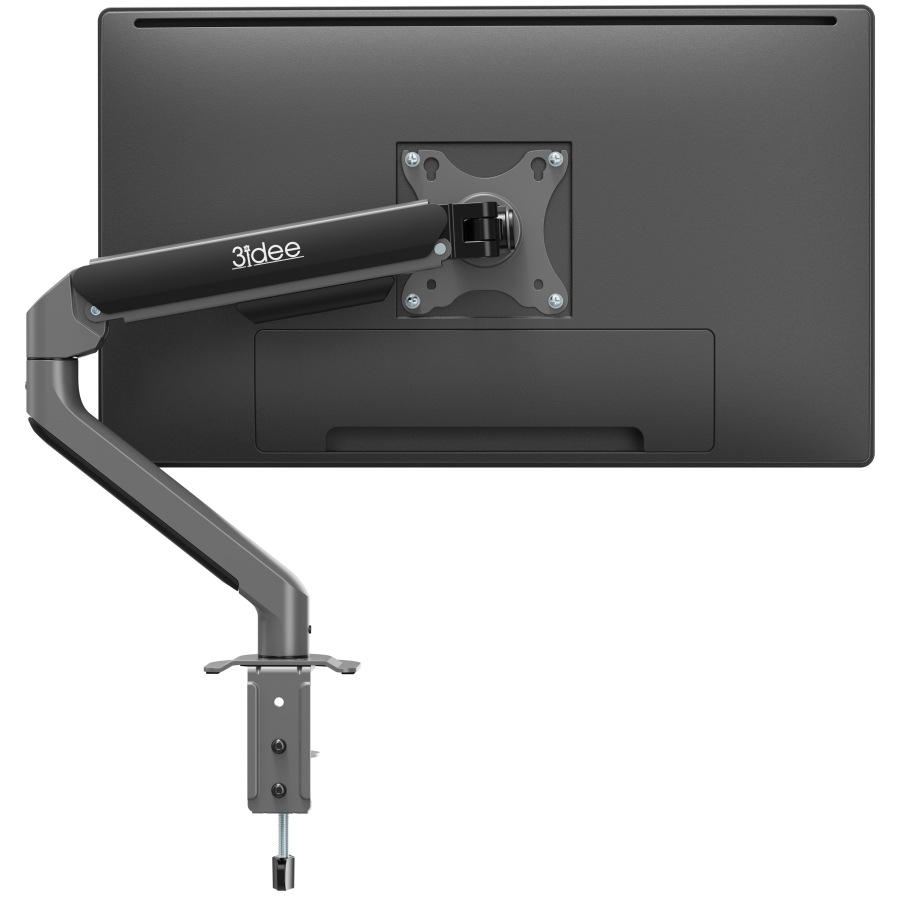
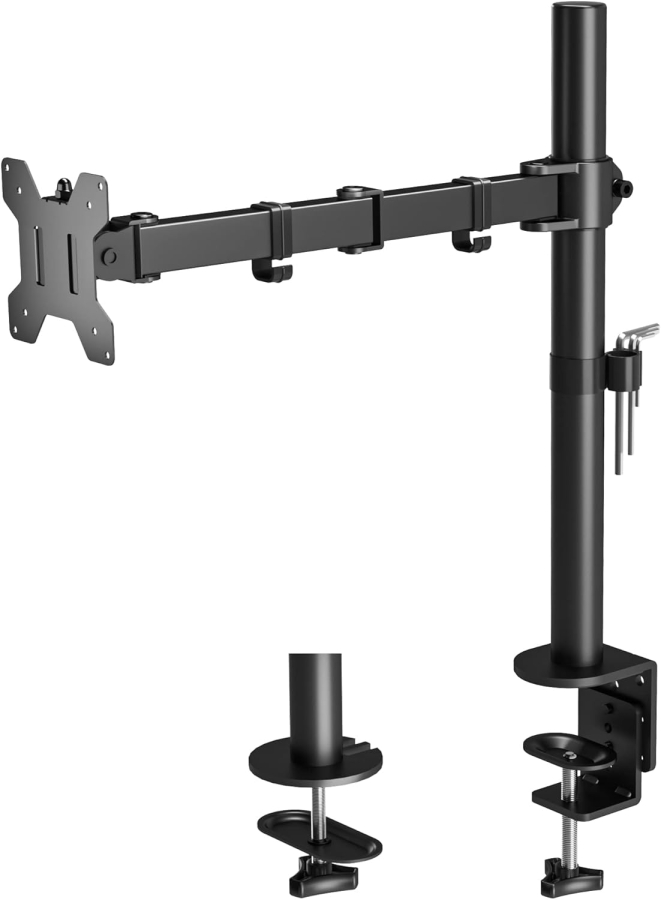
BONTEC UniversalBONTEC Universal 1 Monitor
10 kg
max. load
up to 32"
max. size

min. 2.0 kg
  • Tilt: +/- 90°
  • Swivel: +/- 90°
  • Rotation: 360°
  • Height range: 463 mm (Manual)
  • Mechanism: MANUAL
  • VESA: 75x75 / 100x100
  • Mounting: C-Clamp & Grommet
  • Desk: 10 - 100 mm
  • Material: Steel
✅ Ideal for:
Static Use (Price Winner)
37,68 €
In Stock ✔
Over 500x sold
1.9 Good
View Deal Arrow right
More Details & Technical Data ▼

Technical Details: BONTEC Universal

1. Load Capacity: 10 kg
2. Monitor Size: 13 - 32 Inches
3. Mechanism: Manual (Steel tube)
4. VESA Standard: 75x75 & 100x100
5. Tilt: +/- 90°
6. Swivel: +/- 90°
7. Rotation: 360°
8. Height Range: 463 mm (Manual)
9. Mounting: C-Clamp
10. Desk Thickness: 10 - 100 mm
11. Net Weight: 2.76 kg
12. Special Feature: Very stable (Steel)
💬 Our Verdict

"The BONTEC Universal is the robust choice for static workstations. This height-adjustable, rotatable and tiltable steel mount carries 13-32 inch monitors up to 10kg securely and is ideal if you are looking for an affordable, durable VESA solution."

#5
3idee FlexiLite3idee FlexiLite AV2062
9 kg
max. load
up to 32"
max. size

min. 2.6 kg
  • Tilt: +90° / -45°
  • Swivel: +/- 90°
  • Rotation: 360°
  • Height range: 292 mm (stepless)
  • Mechanism: SPRING
  • VESA: 75x75 / 100x100
  • Mounting: C-Clamp & Grommet
  • Desk: 10 - 80 mm
  • Material: Steel / Alu
✅ Ideal for:
Smooth Adjustment
49,90 €
In Stock ✔
Over 150x sold
2.2 Good
View Deal Arrow right
More Details & Technical Data ▼

Technical Details: BONTEC Short Arm (AV3000)

1. Load Capacity: 10 kg
2. Monitor Size: 13 - 34 Inches
3. Mechanism: Manual (Steel tube)
4. VESA Standard: 75x75 & 100x100
5. Tilt: +/- 15°
6. Swivel: 360°
7. Rotation: 360°
8. Height Range: 425 mm (Manual)
9. Mounting Type: Standard
10. Desk Thickness: 10 - 90 mm
11. Net Weight: 2.2 kg
12. Special Feature: Short arm (space-saving)
💬 Our Verdict

"The BONTEC Short Arm is the space-saving solution for narrow desks or wall-side mounting. This short monitor arm carries even 13-34 inch Ultrawides stably without protruding into the room – perfect for your compact workspace."

✨ Buying Guide: Your 3-Step Guide

Find the perfect monitor mount in three simple steps:

  1. Check Weight & VESA: Weigh your monitor without the stand. Most mounts carry 8-12 kg. Also check the hole spacing on the back (usually 75x75 or 100x100 mm).
  2. Choose Mechanism: Do you work dynamically (Sitting/Standing)? Then a gas spring (movable with one finger) is ideal. For static setups, an affordable rigid mount is sufficient.
  3. Check Desk Top: Measure the thickness of your desk top. Our mounts usually fit 10-80mm. Caution with honeycomb structure desks (hollow inside): Here you mandatorily need a reinforcement plate to distribute pressure.
✨ Summary

The key takeaways from our monitor mount comparison:

  • Best Value Winner: The BONTEC Gas Spring (GDM7501) is ideal for ergonomic work in the Home Office.
  • Heavy Duty & Gaming: For heavy ultrawide monitors (up to 49 inches / 20kg), the ARES WING offers the necessary stability.
  • Space Saver: The BONTEC Short Arm is the perfect solution for narrow desks or near walls.
  • Mounting Tip: All models offer flexible attachment via C-Clamp or Grommet. Pay attention to the correct VESA size of your monitor before buying.
💡 EXPERT TIP

You use 2 monitors?

If a single setup does not meet your requirements, we recommend our detailed comparison test for dual mounts. Find the optimal solution for your multi-monitor setup here.

Go to Comparison: Dual Monitor Mounts ➔

vesa-adapter.com Expert Knowledge: Common Questions about Monitor Mounts

How are the ratings and winners determined?+
Transparency is important to us. Our editorial team physically tests monitor mounts for stability, ease of assembly, and VESA fit accuracy. The "Best Value Winner" is not bought, but based on an algorithm of test score and current market price. We simulate typical home office scenarios as well as maximum loads for gaming setups.
What does VESA mean and how do I find my size?+
VESA (Video Electronics Standards Association) defines the hole spacing on the back of your monitor. Simply measure the distance of the threaded holes horizontally and vertically in millimeters. Common sizes are 75x75mm or 100x100mm. All our mounts at vesa-adapter.com support these standards.
Gas spring vs. Manual mount – which is better?+
That depends on your usage. A gas spring (like the BONTEC GDM7501) allows you to adjust the monitor with just one finger – ideal if you change positions often (sitting/standing). A manual mount is more rigid, cheaper, and perfect if the monitor is set once and stays there. You can learn how this technology works in detail in our Guide to Monitor Arm Mechanics.
Can my desk support the weight?+
Most desks (chipboard, solid wood) from 10mm thickness are suitable without problems. Caution is only advised with very cheap honeycomb structure desks (e.g., some IKEA models with cardboard filling). Here we recommend a reinforcement plate for you to distribute the pressure of the clamp.
Can I also mount curved monitors?+
Yes, absolutely. However, note that curved monitors often appear slightly heavier due to their center of gravity. We therefore recommend you not to fully max out the weight limit of the mount with curved monitors. The ARES WING, for example, is excellent for curved monitors.
What is the difference between C-Clamp and Grommet mounting?+
The C-Clamp is screwed to the edge of the desk (no drilling necessary). The Grommet mounting is attached through a hole in the desk. The latter often looks "cleaner" and allows mounting even in the middle of the table, but requires a hole in the tabletop. Our sets usually include both options.
My monitor lowers by itself – is the mount broken?+
No, that is usually just a setting issue. With gas springs, you have to adjust the tension to the weight of your monitor. There is an adjustment screw on the joint for this. Turn it towards "+" to increase the spring force until the monitor floats.
Is mounting hardware included?+
Yes, we at vesa-adapter.com place great importance on completeness. All necessary screws for monitor and table, as well as Allen keys are included. You usually only need a Phillips screwdriver.
How much space do I save with a monitor arm?+
A huge amount. A standard monitor stand often takes up 20-30cm of depth. Our mounts often only need 10x10cm at the base. Plus, the monitor floats, so you can use the space underneath for keyboard, notes, or soundbar.
Are the mounts also suitable for iMacs or Apple Displays?+
Apple monitors often do not have VESA holes. You usually need a special VESA adapter for them (which we also carry in our range). Once the adapter is mounted, they fit all arms listed here. Exception: The Pro Display XDR has its own standards.
Why buy from vesa-adapter.com?+
We are specialists. Unlike large general retailers, we know every product. We test the load limits ourselves, offer expert support, and ensure that you get exactly the mount that carries your expensive equipment safely.
Your cart
Subtotal: 0,00 €
Fingerprint
Chat on Whatsapp

Sign up to our newsletter

for important news, great offers and insights from the VESA Adapter Team

vesa-adapter.com
vesa-adapter.com
3idee SARL
19, Rue de Bitbourg
1273 Luxembourg
Luxembourg
info@vesa-adapter.com
Live Chat

Support

  • Return
  • Goods not arrived
  • Product damaged
  • FAQ
  • Assembly instructions

Information

  • About us
  • Shipping
  • Privacy policy
  • Our Terms & Conditions
  • Imprint
  • Right of withdrawal

Find it fast

  • Acer
  • AOC
  • ASUS
  • BenQ
  • CSL
  • DELL
  • HP
  • HP Omen
  • Huawei


  • Koorui
  • Lenovo
  • LC-Power
  • MSI
  • ODYS
  • Philips
  • Samsung
  • Viewsonic
  • Xiaomi
© 2026 - 3idee Sàrl
Paypal AmazonPay klarna Visa Mastercard American Express Discover Diners Club Carte Bancaire JCB Union Pay eps iDeal bancontact Przelewy24

Hello, welcome back

Login to manage your account.

Forgot passwort?
No account yet? Register now

Welcome to vesa-adapter.com

Complete the form to create an account

You already have an account? Login

Forgot passwort?

Enter your email address and we will send you an email with your new password.

You remember again? Login